
The Challenge of Modern Application Delivery
In the modern enterprise, the workforce is rarely tethered to a single operating system. IT departments are tasked with delivering mission-critical Windows legacy applications alongside high-performance Linux tools to a diverse fleet of devices. Traditionally, this required managing fragmented silos or investing in overly complex desktop virtualization software that struggled to bridge the gap between platforms.
The old way of doing things, relying on heavy, Windows-centric stacks like Citrix or VMware/Omnissa Horizon, often results in high latency, skyrocketing licensing costs, and a disjointed user experience.
To thrive in a hybrid world, organizations need virtual desktop solutions that treat Windows and Linux as first-class citizens. Inuvika OVD Enterprise was built to do exactly that, providing a unified platform that delivers any app to any device, seamlessly.
Section 1: The Unified Workspace: Windows and Linux Side-by-Side
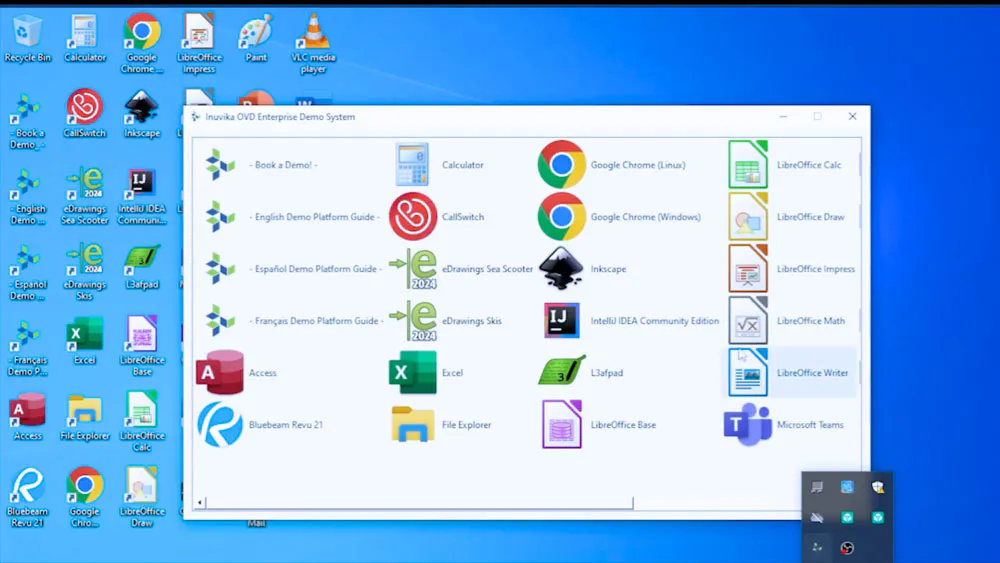
Inuvika OVD Enterprise stands out among desktop virtualization solutions by allowing users to access Windows and Linux applications within the same session. This is not just about having two windows open. It is about a completely integrated workflow.
| Capability | Legacy VDI (Citrix/VMware) | Inuvika OVD Enterprise |
| App Co-existence | Often requires separate logins or complex double-hop configurations | Native integration; Windows and Linux apps appear on the same taskbar |
| User Experience | Performance varies wildly between OS types; high resource overhead | Highly optimized video streaming and native support for Teams and Zoom |
| Thin Client Support | Requires expensive third-party OS licenses for hardware repurposing | Inuvika’s ResoluteOS turns any hardware into a secure, high-speed thin client. Now with ARM64 support for low-cost devices like Raspberry Pi |
| Peripheral Support | Frequent issues with USB redirection in mixed environments | Unmatched premium USB redirection for printers, scanners, and webcams |
| Endpoint Security | Password-based authentication creates credential risk at the edge | SAML2 passwordless authentication support eliminates credential-based attacks while maintaining seamless login experience |
By utilizing Inuvika OVD Enterprise, organizations eliminate the friction of switching environments, allowing employees to focus on productivity rather than platform compatibility.
Modern enterprises increasingly prioritize Environmental, Social, and Governance (ESG) commitments. By repurposing existing hardware through ResoluteOS rather than purchasing new endpoints, organizations reduce electronic waste, lower carbon footprint, and align with 2026 green IT initiatives. Extended hardware lifecycles from 3-5 years to 7-10 years represent meaningful contributions to sustainability goals.
Section 2: Architectural Efficiency: The Power of Linux
The secret to Inuvika’s success as one of the top desktop virtualization solutions is its Linux-based foundation. While legacy providers force you into a stack of expensive Microsoft dependencies, Inuvika leverages the efficiency of Linux to slash costs.
Resource Containerization: Our platform packs more users onto each application server compared to traditional VDI. This reduces the number of Windows Server licenses required and lowers overall hardware CAPEX.
No Hidden Fees: Unlike many virtual desktop solutions, Inuvika does not require costly Microsoft SQL Server licenses or separate secure gateways. The Enterprise Secure Gateway is included in the subscription.
Concurrent User Licensing: Stop paying for users who are not active. Our model is based on concurrent users, not named users or devices, ensuring you only pay for what you actually use.
Performance & Security: OVD Enterprise features next-generation RDP (FreeRDP 3.x) for superior graphics performance, while ResoluteOS endpoints support SAML2 passwordless authentication, eliminating the need for users to enter credentials on untrusted endpoints.
START YOUR FREE TCO ASSESSMENT TODAY
Section 3: Freedom of Choice: Hypervisor and Cloud Agnosticism
One of the biggest risks in selecting desktop virtualization software is vendor lock-in. When your VDI provider forces you to use their specific hypervisor or cloud, you lose your ability to negotiate pricing.
Inuvika OVD Enterprise is fully agnostic. Whether you choose to deploy on-premises or in the cloud, our platform supports:
Any Hypervisor: vSphere, KVM, Nutanix AHV, Hyper-V, Proxmox VE, or VergeOS.
Any Cloud: Amazon Web Services (AWS), Google Cloud Platform (GCP), Microsoft Azure, or private clouds.
Any Directory: Native integration with Active Directory or LDAP for seamless user management.
This flexibility ensures that your desktop virtualization solution remains future-proof, allowing you to move workloads to the most cost-effective infrastructure as your business evolves.
Conclusion: A Seamless, Secure, and Scalable Future
Delivering Windows and Linux applications should not be a headache for IT or a burden on the budget. By choosing a solution built on the principles of Zero Trust and open architecture, organizations gain a high-performance environment that is easier to manage and 60 percent more affordable than legacy alternatives.
The decision is clear: move away from the complexity of the past and embrace a unified approach to application delivery.
Discover how much you could save with Inuvika OVD Enterprise. Use our free TCO Assessment to calculate your actual desktop virtualization costs and compare against Citrix, VMware, and other legacy solutions.
START YOUR FREE TCO ASSESSMENT TODAY
Or explore Inuvika OVD Enterprise directly with a free 30-day trial and experience how unified Windows and Linux application delivery, ARM device support, and SAML2 passwordless authentication combine to modernize your workspace.